DNBelab C Series HT C6 Analysis Pipeline
Multiplexed Single-Cell RNA Analysis & Sample Deconvolution Guide
Overview 
C6 is a high-throughput multiplexed single-cell RNA-seq solution based on Sample Barcode multiplexing. Multiple biological samples are labeled with distinct Sample Barcodes during library construction and pooled for sequencing. In the bioinformatics stage, dnbc4tools automatically demultiplexes samples, aggregates beads, independently calls cells per sample, and generates full expression quantifications and interactive quality reports.
Workflow: Data Input → Barcode Demultiplexing → Alignment → Bead Aggregation → Per-Sample Cell Calling → Unified & Per-Sample Deliverables
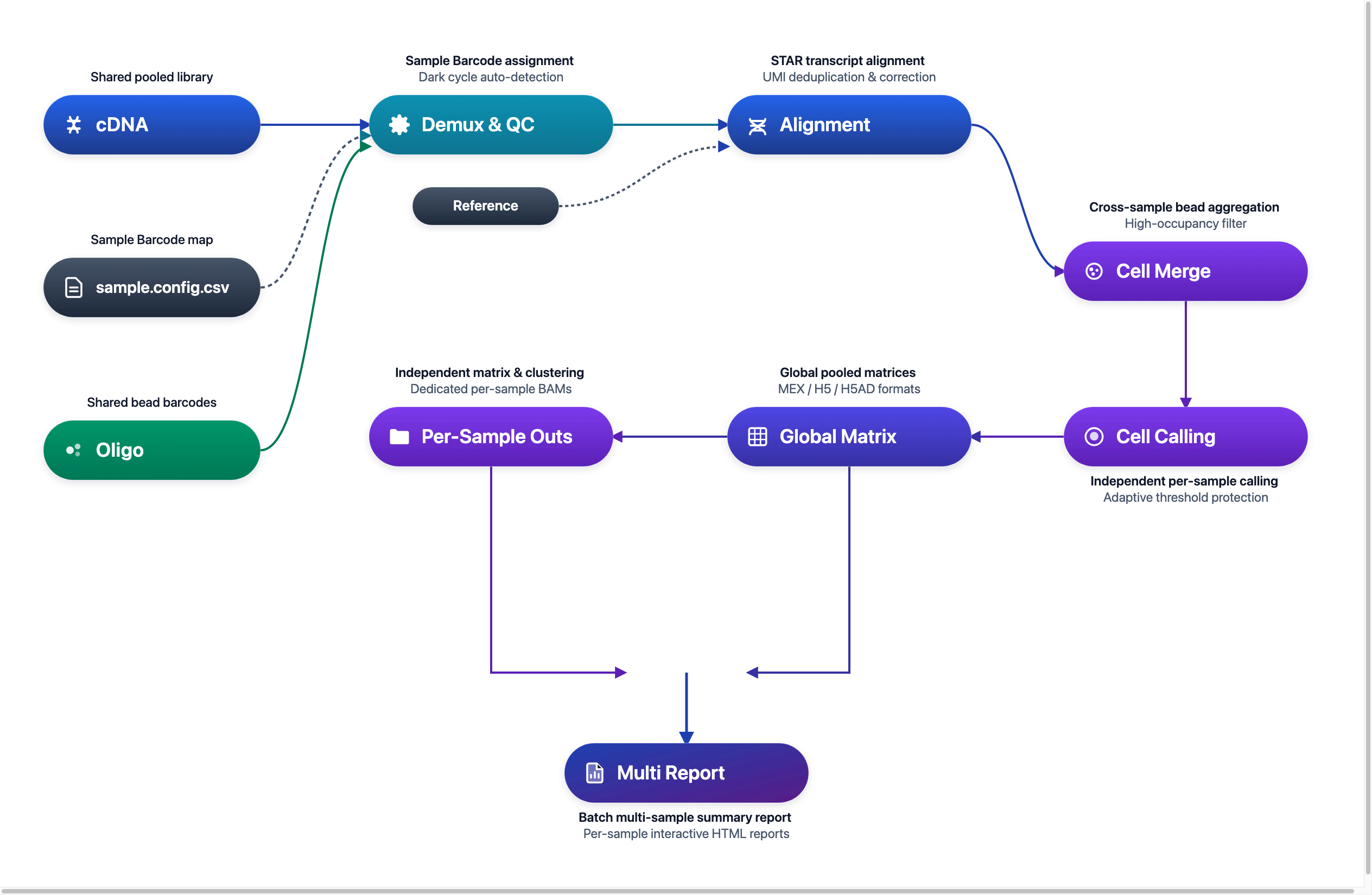
Usage Note:
$dnbc4toolsrepresents the executable path and should be replaced with your actual installation path. The C6 workflow is orchestrated via themulti runcommand to automate sample demultiplexing and per-sample deliverables.
Core Steps 
The C6 pooled multiplexing workflow encompasses 5 essential stages from shared raw libraries to per-sample outputs:
| Step | Stage | Core Mechanism | Key Inputs & Deliverables |
|---|---|---|---|
| 01 | Input Preparation & Validation | Shared dual libraries; automated dark cycle detection; sectioned CSV validation | Shared FASTQs, Config CSV ➔ Validated Parameters |
| 02 | Sample Barcode Demultiplexing | Extracts barcodes from Oligo reads with whitelist error correction | Oligo Reads ➔ Droplet Assignment, Unassigned Tracking |
| 03 | Alignment & Bead Aggregation | STAR alignment & annotation; similarity-based bead pooling; global high-occupancy filtering | cDNA Reads ➔ Alignment BAM, Bead-to-Cell Merging |
| 04 | Independent Cell Calling | Completely isolated per-sample EmptyDrops calling; adaptive noise safeguards | Assigned Droplets ➔ Per-Sample Authentic Cells |
| 05 | Archiving & Output | Per-sample matrices/reports/BAMs; pooled combined matrix & batch summary report | per_sample_outs/ Deliverables + Combined Report |
Step 1: Input Preparation & Configuration 
- Sequencing Libraries: A shared pooled pair of cDNA and Oligo FASTQ libraries.
- Pipeline Configuration: A sectioned CSV file (e.g.,
sample.config.csv) declaring sample identifiers and their corresponding Sample Barcodes in the[samples]section. - Dark Reaction Auto-Detection: Version 3.2 automatically detects dark reaction cycles (Dark Cycles) in cDNA and Oligo reads without manual intervention.
Step 2: Sample Barcode Identification & Demultiplexing 
- Barcode Matching: Extracts Sample Barcodes from Oligo reads and matches them against the built-in whitelist with error-correction.
- Flexible Mapping: Assigns beads and droplets to their respective biological samples; supports single barcodes (e.g.,
BC01) or multi-barcode assignments per sample (e.g.,BC02;BC03). - Unassigned Tracking: Reads that cannot be confidently matched to a known barcode are tracked under the Unassigned category, for reviewing unassigned read counts.
Step 3: Transcript Alignment & Bead Aggregation 
- High-Quality Alignment: Aligns cDNA reads against the reference genome using an optimized STAR workflow with functional region annotation.
- Cross-Sample Bead Aggregation: Uses a robust bead similarity scoring algorithm to merge beads originating from the same physical droplet while retaining Sample Barcode suffixes.
- Experiment-Wide High-Occupancy Filtering:
high_occupancy_filter=trueis enabled by default to remove multiplexed droplet artifacts across the entire experiment.
Step 4: Independent Cell Calling per Sample 
- Isolated Calling: Droplets assigned to each sample undergo independent cell calling (EmptyDrops), so that the called-cell set is determined separately for each sample.
- Adaptive Bounds Protection: 3.2 introduces upper and lower bounds on the automatically estimated cell count.
- Intra-Cell UMI Conflict Resolution: Resolves ambiguous UMIs mapped to multiple genes within the same cell using read counts; UMIs without a unique gene assignment are excluded from expression counts.
Step 5: Result Archiving & Output 
- Per-Sample Deliverables: Each sample receives its own subdirectory under
per_sample_outs/<sample>/with raw/filtered expression matrices (MEX, H5, and H5AD formats), dimensionality reduction, clustering (PCA, UMAP, marker genes), and an interactive HTML report. - Per-Sample BAM Output: When BAM generation is enabled, alignments are partitioned into sample-specific BAM files (
<sample>_alignments.bam), alongside unassigned alignments and a shared oligo BAM. - Root Combined Matrices: A unified matrix containing all called cells across all samples is provided in the root directory (MEX, H5, H5AD) with raw counts for downstream batch correction (e.g., Harmony).
- Batch Multi-Sample Report: A root
<run>_multi_report.htmlsummarizes cell counts, sequencing saturation, library QC, and cross-sample comparison charts.
Input Configuration 
C6 analysis uses a sectioned CSV configuration file (commonly named sample.config.csv), consisting of three core sections:
| Section | Purpose | Key Parameters |
|---|---|---|
[rna] |
Global transcriptome and run settings | genomeDir, chemistry,scRNAC6, darkreaction,auto, no_bam |
[libraries] |
Shared sequencing library path declaration | fastqs (pointing to the directory containing cDNA/ and oligo/), feature_types,rna |
[samples] |
Sample and Sample Barcode mapping table | sample_id, probe_barcode_ids, expectcells (optional) |
Minimal Configuration Example
[rna]
genomeDir,/database/scRNA/Homo_sapiens
chemistry,scRNAC6
darkreaction,auto

[libraries]
fastqs,feature_types
/rawdata/c6_pooled_run,rna

[samples]
sample_id,probe_barcode_ids
Sample_1,BC01
Sample_2,BC02;BC03
Optional BAM output setting: This example uses the default
[rna] no_bam,false, generating per-sample BAMs, unassigned BAM, and oligo BAM with their applicable indexes. To save disk space, addno_bam,trueto[rna]; BAM files and their indexes will then be omitted.Tip: If multiple barcodes are assigned to the same sample, separate them with semicolons
;(e.g.,BC02;BC03). For complete configuration specifications, refer to C6 Parameters.
Main Analysis Pipeline 
Execution Command
$dnbc4tools multi run \
  --name c6_demo \
  --csv sample.config.csv \
  --outdir ./results \
  --threads 16
Pre-Run Checklist
C6 Pre-Run Verification Checklist
- Chemistry Type Declaration: Ensure
chemistry,scRNAC6is configured in the[rna]section of the CSV. - Shared Data Paths: Ensure
fastqsin[libraries]points to a valid path containing pairedcDNA/andoligo/subdirectories and FASTQ files. - Sample Barcode Mapping: Verify
sample_idvalues in[samples]are unique, andprobe_barcode_idscorrespond to experimental barcodes (e.g.BC01orBC02;BC03). - STAR Reference Index: Verify
genomeDirpoints to a complete and valid STAR reference directory.
Execution Process
After auto-detecting dark reaction cycles and validating barcodes, the software executes demultiplexing and per-sample analyses:
====================================================================================================
Running [samples] C6 RNA pipeline — 2026-11-02 18:11:02
====================================================================================================

====================================================================================================
Parsed FASTQ Inputs - 2026-11-02 18:11:02
====================================================================================================
Type         | Path
-------------+--------------------------------------------------------------------------------------
cDNA Read1   | /rawdata/c6_pooled_run/cDNA/sample_cDNA_R1.fastq.gz
cDNA Read2   | /rawdata/c6_pooled_run/cDNA/sample_cDNA_R2.fastq.gz
oligo Read1  | /rawdata/c6_pooled_run/oligo/sample_oligo_R1.fastq.gz
oligo Read2  | /rawdata/c6_pooled_run/oligo/sample_oligo_R2.fastq.gz
====================================================================================================


2026-11-02 18:12:21 Starting oligo library filtering...
...done

2026-11-02 18:13:26 Starting cDNA library filtering...
...done

2026-11-02 18:25:31 Correcting RNA barcodes and preparing alignment inputs...
...done

2026-11-02 18:27:22 Performing read alignment and UMI counting...
...done

2026-11-02 18:54:34 Calculating multi sample bead similarity and barcode translation...
...done

2026-11-02 18:54:56 Generating raw gene expression matrix...
...done

2026-11-02 18:57:42 Generating cell-filtered gene expression matrix...
...done

2026-11-02 18:58:02 Calculating sequencing saturation metrics...
...done

2026-11-02 18:58:34 Generating per-sample RNA matrices, saturation, and expression metrics...
...done

2026-11-02 18:59:23 Generating per-sample position-sorted BAM files...
...done

2026-11-02 19:04:24 Performing per-sample dimensionality reduction and clustering analysis...
...done

2026-11-02 19:05:12 Performing mixed-species classification for "mouselars2_and_macaca"...
...done

2026-11-02 19:05:13 Generating multi sample assignment outputs...
...done
✔ Prepared RNA summary metrics

====================================================================================================
Running combined report generation — 2026-11-02 19:05:14
====================================================================================================
Combined report sections:
✔ rna: success
✔ samples: success
✔ Outputs organized in ./results/c6_demo/outs

Analysis finished successfully!
When the message Analysis finished successfully! appears, the analysis is complete.
Results Interpretation 
Output Directory Structure
Upon completion, results are archived under <outdir>/<name>/outs/:
<outdir>/<name>/outs/
├── <name>_multi_report.html              # Batch multi-sample summary report
└── rna/
    ├── raw_feature_bc_matrix/            # Global unfiltered matrix (MEX)
    ├── filtered_feature_bc_matrix/       # Global filtered cell matrix (MEX)
    ├── filtered_feature_bc_matrix.h5ad   # Global filtered matrix (H5AD, no cross-sample clustering)
    ├── singlecell.csv.gz                 # Global droplet detail table (with bead merges and sample tags)
    ├── metrics_summary.xls               # Global experiment metrics summary
    ├── multi_sample/                     # Demultiplexing and sample QC metrics
    │   ├── per_sample_metrics.csv        # Per-sample metric comparison table
    │   └── barcode_assignment_metrics.json # Sample Barcode assignment statistics
    └── per_sample_outs/<sample>/         # [Per-sample output directory]
        ├── filtered_feature_bc_matrix/   # Sample-specific filtered matrix
        ├── <sample>_scRNA_report.html    # Sample-specific interactive HTML report
        ├── metrics_summary.xls           # Sample-specific metrics summary
        └── analysis/                     # Sample-specific clustering, dimensionality reduction & markers
Key Deliverable Files
| File/Directory | Description |
|---|---|
<name>_multi_report.html |
Batch multi-sample summary report comparing cell counts, saturation, and demultiplexing quality |
rna/per_sample_outs/<sample>/ |
Per-sample output containing independent matrices, clustering plots, and sample report |
rna/filtered_feature_bc_matrix.* |
Global combined matrix combining all called cells, ready for downstream batch correction |
rna/singlecell.csv.gz |
Global droplet detail table recording bead-to-cell mapping, cell calling status, and sample assignment |
Detailed Output Guide: Please refer to C6 Output Interpretation for a comprehensive explanation of deliverables and metrics.